Generative Artificial Intelligence is no longer a conceptual tool; it is being integrated directly into corporate productivity ecosystems. In the realm of data analysis and Financial Planning & Analysis (FP&A), the introduction of AI-powered assistants directly into spreadsheets represents the biggest technological shift of the last decade.
This article comprehensively and objectively analyzes how Microsoft Copilot in Excel and the integrated AI features in Google Sheets (formerly Duet AI / Gemini for Workspace) are transforming the speed, accuracy, and architecture of financial modeling and variance analysis.
1. The Impact of Artificial Intelligence on Modeling
Financial modeling requires hours of data gathering, cell structuring, formula auditing, and «What-If» scenario design. The integration of Large Language Models (LLMs) into spreadsheets is not intended to replace the financial analyst but to act as an analytical «co-pilot» that drastically reduces the time spent on routine tasks.
These tools allow operating databases using natural language, which democratizes advanced statistical analysis for executive profiles and accelerates the construction of operational cash flows and sensitivity analyses.
2. Microsoft Copilot in Excel: Integration and Analytical Power
Microsoft has deployed Copilot by leaning on Excel’s solid technical infrastructure, combining the power of LLMs with the traditional calculation engine.
Formula Generation and Anomaly Detection
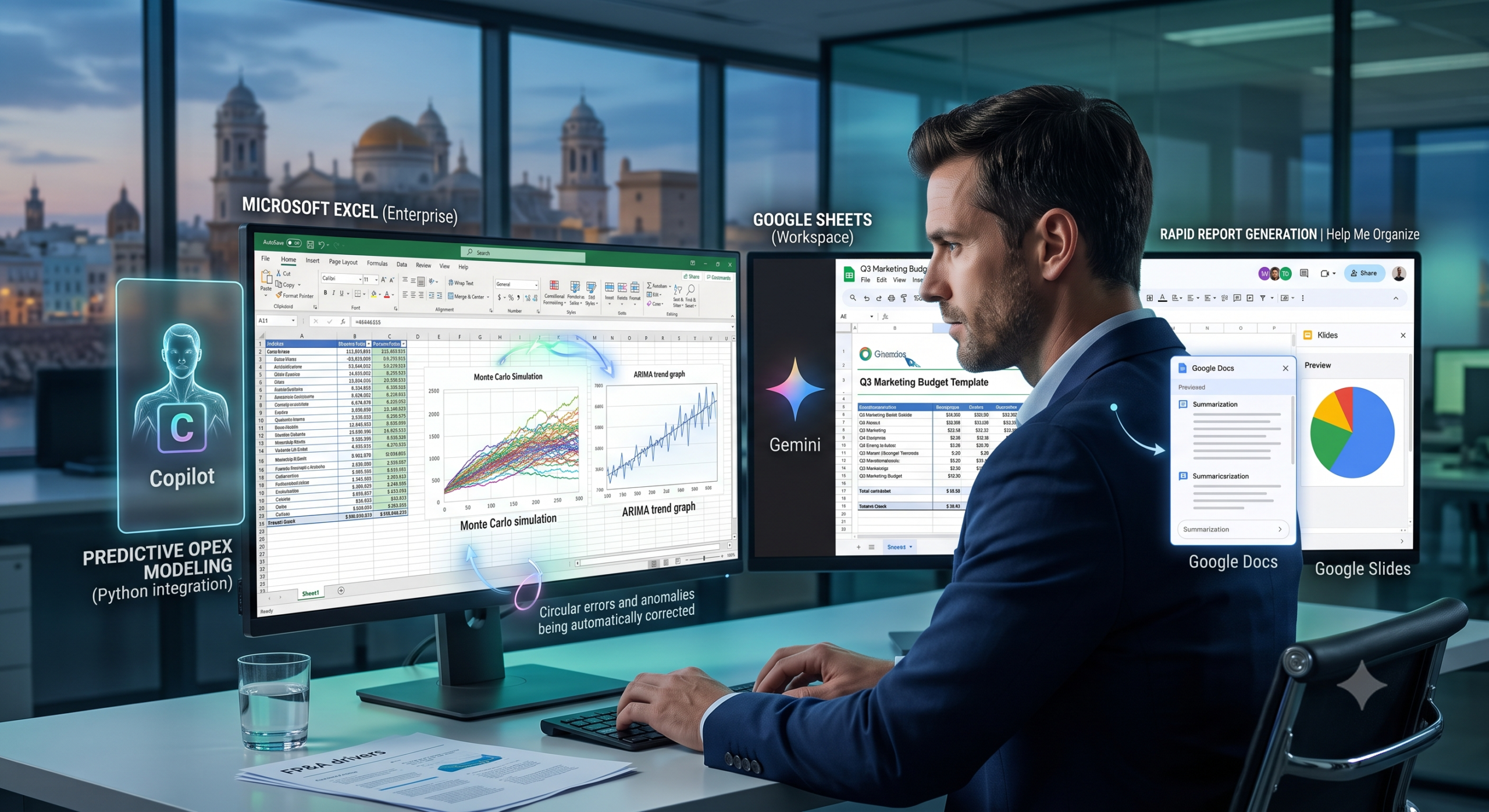
Copilot excels in its ability to interpret complex instructions. An analyst can request: «Generate a column calculating year-over-year operational revenue growth, excluding Q2 outliers». The AI will write and apply the corresponding DAX formula or array function. Furthermore, Copilot possesses a remarkable ability to audit models, automatically illuminating discrepancies, circular errors, or atypical fluctuations (anomalies) in extensive historical ledgers.
Python Integration and Predictive Modeling
The true competitive advantage of Excel in this environment is the convergence of Copilot with native Python integration. Finance teams can ask Copilot to write Python code to execute Monte Carlo simulations or time-series forecasting (ARIMA) on the sheet’s data, processing the information directly in Microsoft’s cloud without needing to configure local development environments.
3. AI in Google Sheets: Cloud Collaboration and Agility
The Google Workspace approach is intrinsically linked to collaboration, speed, and cloud processing, integrating its Gemini models directly into Sheets.
Data Structuring and Automatic Organization
AI in Google Sheets shines in the initial stages of modeling and operational project management. Through the «Help me organize» feature, a user can request: «Create a template for tracking the Q3 marketing budget, broken down by digital channels and with expected ROI tracking». Sheets will automatically generate a formatted tabular structure, complete with drop-down menus and data validation fields.
Interoperability in the Workspace Ecosystem
Google AI’s greatest strength is cross-app connectivity. A CFO can ask the AI in Google Docs or Slides to analyze a financial table in Google Sheets and automatically draft an executive summary for the steering committee or generate explanatory charts regarding OPEX variance. This workflow capability enormously reduces financial reporting generation time.
4. Data Governance and Corporate Privacy
A critical aspect when implementing AI in models containing sensitive financial information (balance sheets, upcoming mergers, payrolls) is privacy. Both tech giants have structured their corporate versions strictly: financial data ingested into spreadsheets via Copilot (Enterprise license) or Google Workspace is not used to train the public foundational language models. Interactions remain within the security perimeter of the organization’s tenant, ensuring compliance with data protection regulations (such as GDPR and SOC).
Reflection on Technological Adoption: When considering the integration of Artificial Intelligence assistants into your financial workflows, which functionality do you perceive as most urgent for your department’s efficiency: the automated detection of errors in complex formulas, or the rapid generation of executive reports from raw data? Share your perspective in the comments.
5. Frequently Asked Questions (FAQ) on AI in FP&A
Can AI build a complete financial model (DCF or LBO) autonomously from scratch? Currently, no. Language models are excellent assistants for structuring templates, writing complex formulas, or identifying variances. However, the underlying business logic, macroeconomic risk evaluation, and strategic assumptions (drivers) must be designed and validated by the human judgment of the financial professional.
Are the calculations generated by Copilot or Gemini always accurate? AI tools are subject to «hallucinations» (generating seemingly logical but factually incorrect results). Because of this, the platform always exposes the underlying formula or code it used to calculate a metric, allowing the analyst to audit and certify the mathematical traceability before making a decision based on that data.